
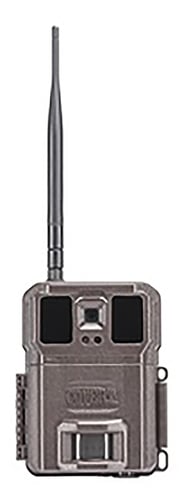
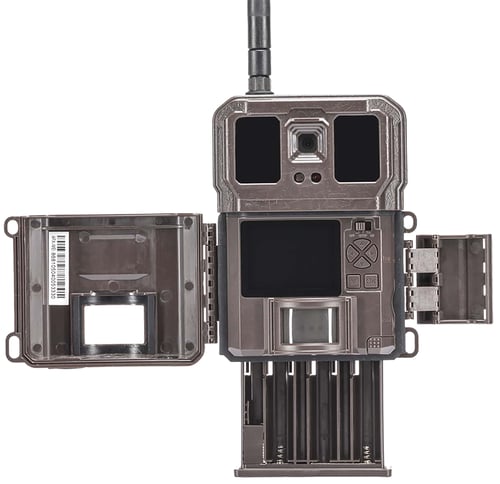

Covert Scouting Cameras CC8014 WC30 Brown 2.40" Color Display, No Glow Flash, Up to 32GB/SD Card Memory
 Be the first to leave a review!
See Price in Cart
product code:CC8014
UPC:850022648014
Brand:Covert
availability:Currently out of Stock
Notify me when this product comes back in stock
The Covert WC30-V Scouting Camera includes a SIM card and functions on the Verizon wireless backbone with exceptional reliability. With the ability to capture and transmit both photos and video, you will appreciate the cameras ability to store images and videos locally while transmitting hi-res images and 720p videos to the Covert Web Portal and mobile app. Features a pipe through security port, brown housing and reinforced tripod mount that's perfect for use with any of Coverts extensive line of camera mounts; .2-second trigger speed ensures media capture of photos and videos with game; 48 Infrared No-Glow LED's and MaXimum Silence image capture prevents spooking game. Compatible with up to a 32GB SD card, each event is stamped with Time/Date/Temp/Moon Phase and stored on the media card and sent to the Web Portal and Wireless App. Operates on 12 AA batteries and accepts a memory card up to 32GB.
| Camera Type | |
| Picture or Video | Photo/Video |
| Resolution | 30MP |
| Flash | No Glow 100' |
| Power Source | |
| Display | 2.40" Color |
| Proofs | |
| Memory | Up to 32GB/SD Card |
| Finish Color | |
| Audio | |
| PIR Setting | |
| Wireless Capable | Yes |
| Photo Settings | Turbo Burst 1-10 |
| Video Settings | 720p HD |
| Stamp | Date/Moon Phase/Temp/Time |
Leave a Review!
you may also like!

Please contact the website administrator.
| The following information is meant for the website developer for debugging purposes. | ||||||||||||||||
| Error Occurred While Processing Request | ||||||||||||||||
|
||||||||||||||||