
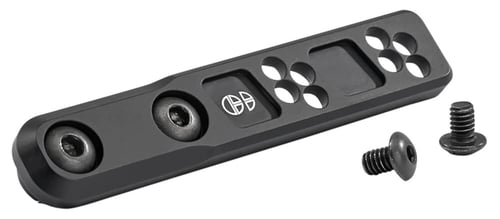
Cloud Defensive TORMLOKINLINE Torrent Mounts Inline M-LOK Mount Black Anodized
 Be the first to leave a review!
See Price in Cart
product code:TORMLOKINLINE
UPC:850016201386
Brand:Cloud Defense
availability:Currently out of Stock
Notify me when this product comes back in stock
The Cloud Defensive Torrent series. Manufactured for us by Impact Weapons Components. The Torrent Inline M-LOK light mount is a very traditional mount which acts as a direct mounting option for your light. Instead of requiring a rail section to be added to you M-LOK rail, you can use this mount. To provide the highest level of supporting structure, this mount should be attached in a way that it does not have any portion hanging off the rail. If it hangs off the rail, it does run a risk of being bent under pressure. The Inline mount plays well with most IR devices including the B.E. Meyers MAWL, L3 PEQ-15, L3 NGAL, Steiner DBAL and many others. Directly attaches to any M-LOK compliant rail surface. Forward mounting design is low profile, lightweight and does not impede weapons manipulation. Mount does not interfere with the operation of front back-up iron sights. Compatible with: Cloud Defensive REIN 1.0/2.0/3.0/REIN Micro 1.0/2.0/3.0. Surefire M300/M600-Except M600 AA. Streamlight ProTac Rail Mount 1/2/HL-X- Except Inline Mounts. Works with replacement light bodies that use Scout Light mounts style.
| Type | |
| Model | Torrent Mounts |
| Style | Inline |
| Misc | |
| Finish | |
| Material | 6061-T6 Billet Aluminum |
| Pieces | |
| Gun Type | |
| Mount Type | M-LOK |
| Length | |
| Rings Included | |
| Ring Height | |
| Mount Height | |
Leave a Review!
Please contact the website administrator.
| The following information is meant for the website developer for debugging purposes. | ||||||||||||||||
| Error Occurred While Processing Request | ||||||||||||||||
|
||||||||||||||||