
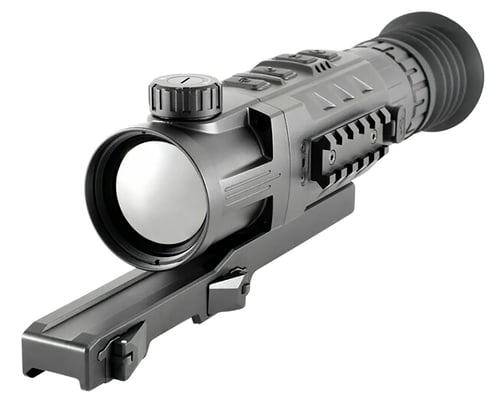
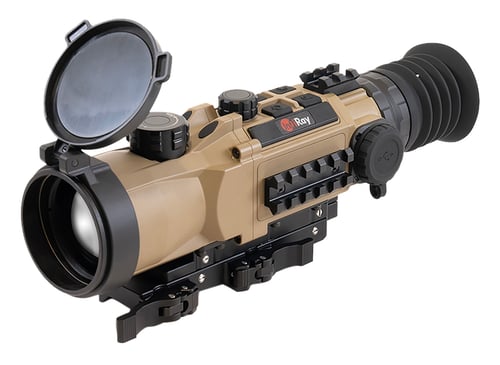
InfiRay Outdoor RH50 RICO MK1 Thermal Rifle Scope Black 3x 50mm Black/White/Red/Green; 2 Dynamic/5 Static Reticle 640x480, 50Hz Resolution
 Be the first to leave a review!
See Price in Cart
product code:RH50
UPC:850029093008
Brand:Infiray Outdoor
View more from Infiray Outdoor
availability:Currently out of Stock
Notify me when this product comes back in stock
The RICO Series was built to do two things: Make the best image possible and be easy to use. The heart of the RICO Series features a iRay Micro II core and an high contrast AMOLED HD display. RICO takes its image processing one step further with Advanced Image Correction and Automatic Image Optimization courtesy of the MATRIX III image algorithm. The system is optically and electronically optimized and produces an image that pushes the boundaries of long-wave infrared image clarity. Image quality paired with an intuitive and easy to use interface, PIP picture function, Aluminum alloy housing, 1000 G shock resistance and 32GB of internal memory. A Li-Ion 3.7 Volt, 4400 mAh battery pack operates the Mk1 for a minimum of 6 hours and up to 10 hours on standby. The battery can be quickly removed and replaced with a new with external power connected to the USB-C connector if you don't want to power off. Connect wirelessly via App.
| Magnification | 3x |
| Objective | 50mm |
| Field of View | 9x7 Degrees |
| Type | |
| Generation | |
| Battery | Li-Ion Battery Pack |
| Dimensions | 9.84" x 2.40 x 2.28" |
| Weight | 29.63 oz |
| Focus Range | 2400 yds |
| Resolution | 640x480, 50Hz |
| Intensifier Tube | |
| Diopter Adjustment | -4/+4 |
| Controls | Manual |
| Infrared Illuminator | |
| Battery Life | Up to 10 hrs |
Leave a Review!
you may also like!

Please contact the website administrator.
| The following information is meant for the website developer for debugging purposes. | ||||||||||||||||
| Error Occurred While Processing Request | ||||||||||||||||
|
||||||||||||||||