
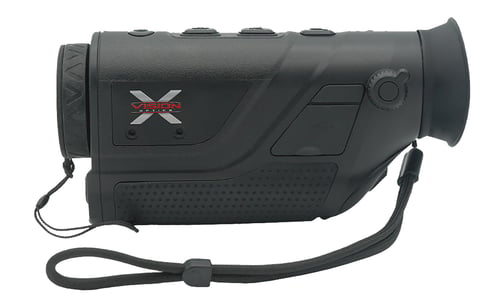
X-Vision 201201 TM50 Thermal Monocular Black, 1.8-3.6x10mm, 1280x960 LCOS, 1,100 yds Detection Range, 256x192 Thermal Sensor, Photo/Video/PiP
 Be the first to leave a review!
See Price in Cart
product code:201201
UPC:850023904294
Brand:X Vision
availability:Currently out of Stock
Notify me when this product comes back in stock
X-Vision Optics 2023 Thermal Monocular (TM50) has a 256 x 192 thermal detector and a 1.8 to 3.6x digital magnification. This allows it to detect big game almost 1200 yards away! Weighing in at 3/4lb with an overall length of 6, the TM50 is compact and lightweight. The TM50 also has Wi-Fi capabilities, picture and record function, internal memory storage, hot spot tracking, and free phone app compatibility. This device is dust and water-resistant to an international protection rating of IP66. The TM50 provides smooth zoom, built-in stadia-metric rangefinding, image quality adjustment, and picture-in-picture functions. At a high frame rate of 25 Hz, the device captures sharp thermal images and smoothly tracks rapid motion in the distance. The thermal monocular has a 1100-yard detection range and a 475-yard recognition range. The objective lens is 10 mm in diameter and has a field of view of 95 at 100 yards.
| Magnification | 1.8-3.6x |
| Objective | 10mm |
| Field of View | 91 ft @ 100 yds |
| Type | |
| Generation | |
| Battery | 18650 Li-ion Rechargeable |
| Dimensions | |
| Weight | 0.75 lbs |
| Focus Range | 475 yds |
| Resolution | |
| Intensifier Tube | |
| Diopter Adjustment | |
| Controls | |
| Infrared Illuminator | |
| Battery Life | 8 hrs |
Leave a Review!
you may also like!
Please contact the website administrator.
| The following information is meant for the website developer for debugging purposes. | ||||||||||||||||
| Error Occurred While Processing Request | ||||||||||||||||
|
||||||||||||||||