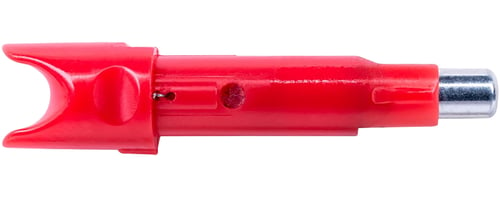
Tenpoint HEA3803R Alpha Blaze Light Nock HP Bushing Red
 Be the first to leave a review!
$43.27
product code:HEA3803R
UPC:788244017298
Brand:TenPoint
availability: In stock
3-pack Alpha-Blaze HPX Lighted Crossbow Nocks (Red) - The Alpha-Blaze HPX Lighted Nock contains a one-piece Nock/LED unit that is indexed with the vanes and press fits into the arrow's Aluminum Bushing. Upon firing the crossbow the bowstring's force compresses the two pieces and activates the lighted nock. Deactivate the easy on/off Alpha-Blaze HPX lighted nock by pulling the nock straight out until the light turns off. The LED light of the Alpha-Blaze HPX system lasts for approximately twenty-four hours when activated. - Easy-to-Use one-piece HPX Nock / LED unit no assembly required - Unmatched Durability - Essential for Crossbow Hunting - Required for Use with TenPoint Rail-less Crossbows TRX 515 AND TX 440. - 515+ FPS approved - Features a Nock Retention Groove that allows the user to both hear and feel the positive engagement of the nock to the string on TenPoint rail-less crossbows - Bowstring activated - Super bright LED light provides superior arrow flight visibility - Easy deactivation - 24-hour battery life when activated (approximate) - Features TenPoint's Alpha-Nock HPX (all TenPoint & Wicked Ridge crossbows require the use of an Alpha-Nock arrow) - Fits all TenPoint & Wicked Ridge arrows with a HP Aluminum Bushing (sold separately) 3 Lighted Nocks per pack - Nock Weight: 27-grains